
n8n appeared quietly. No major launch campaign, no ProductHunt wave. It spread through developer communities, GitHub stars, and Reddit threads where technical founders kept asking the same question: why am I paying for Make or Zapier when I can self-host this for free?
In 2026, that question has gone mainstream. n8n now has over 90,000 GitHub stars, an active self-hosting community, and a cloud version that competes directly with Make.com on price. Meanwhile, Make remains the go-to visual automation platform for non-technical solo founders who want power without code.
We ran both platforms through 60 days of real solo founder workflows — lead routing, email sequences, AI content pipelines, CRM syncs, and webhook-based triggers — to give you the unfiltered answer.
If you already know Make.com from our Make.com review or the Make vs Zapier breakdown, this is where the story gets more interesting.
Quick Verdict
For non-technical solo founders: Make.com wins. The visual canvas, managed infrastructure, and zero DevOps overhead make it the right call for founders who want to automate and get back to their business — not maintain a server.
For technical founders or developers: n8n wins on cost and control. Self-hosted n8n is free forever, with no operation limits, full source access, and a workflow builder that rivals Make’s canvas once you’re past the setup. On cloud, n8n’s pricing is competitive — but the real advantage is ownership.
The honest answer isn’t “pick one.” It’s: know what kind of founder you are.
What Actually Is n8n?
n8n (pronounced “n-eight-n”, short for “nodemation”) is an open-source workflow automation tool. It runs on Node.js, can be self-hosted on any VPS or cloud provider, and offers a visual node-based editor that looks — and in many ways works — like a more technical version of Make’s canvas.
The key difference from Make and Zapier: you can host it yourself, completely free, forever. No per-operation charges, no monthly bills, no vendor lock-in. Your data stays on your infrastructure.
n8n also offers a cloud-hosted version (n8n.cloud) if you don’t want to manage infrastructure — but that’s where it becomes a direct Make.com competitor on price.
Feature-by-Feature Comparison
The Real Cost Comparison
The Takeaway
- Self-hosted n8n = cheapest option on the planet. Server cost only.
- Make.com Core = best cloud value. $10.59/mo beats n8n Cloud at every tier.
- n8n Cloud = more expensive than Make for equivalent volume. Hard to recommend unless you need n8n-specific features.
The Builder Experience — Canvas vs Canvas
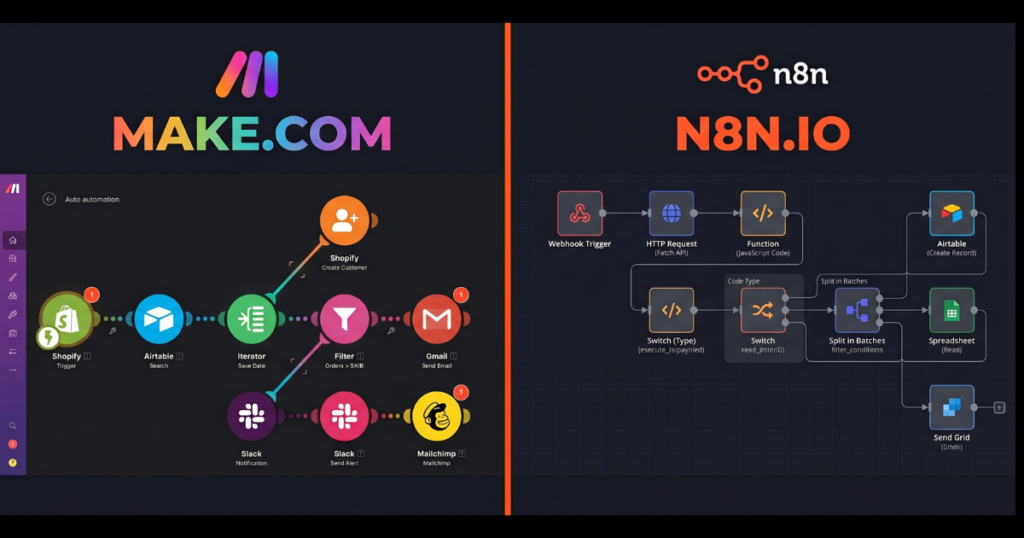
Make’s canvas is designed around a clear left-to-right flow. Routers branch cleanly. Error paths are obvious. The interface gives you visual feedback on what’s running — green lights on successful executions, red on failures, data flowing visually between modules.
n8n’s canvas is more flexible but less guided. Nodes connect via edges like a mind map, allowing more complex topologies. The upside: n8n supports sub-workflows natively, handles complex data structures better, and gives you a Code node that runs full JavaScript or Python when built-in logic isn’t enough.
For a non-technical founder: Make wins on day one. For a founder comfortable with code: n8n’s flexibility wins long-term.
AI Automation — Where n8n Pulls Ahead
Both platforms support OpenAI and Anthropic natively. But n8n goes further with deep LangChain integration — multi-agent AI pipelines, memory chains, RAG workflows, and tool-calling agents entirely within the visual editor, without custom code. You can even connect to local models via Ollama, keeping AI inference on your own infrastructure.
Make’s AI capabilities are solid for basic LLM calls — summarize, classify, generate. But it doesn’t natively support agent-style workflows or memory chains. For founders building AI-powered products in 2026, n8n’s AI depth is a genuine differentiator.
The DevOps Cost of Self-Hosting n8n
Self-hosting n8n is not hard — but it’s not nothing. You’ll need a VPS ($5–10/mo), basic Docker knowledge, a domain with SSL, and occasional maintenance for updates and backups.
The Simple Test
If the words “Docker” and “SSL certificate” make you pause — Make.com is your answer.
If that list reads like a Tuesday afternoon project — n8n self-hosted is yours.
Pros & Cons — Make.com
✅ Pros
- Zero setup, zero ops — sign up and build. No servers, no Docker, no maintenance.
- Polished visual canvas — best non-technical automation builder on the market.
- 1,800+ native integrations — covers virtually every SaaS tool a solo founder uses.
- Predictable pricing — $10.59/mo for 10,000 operations, no surprises.
- Strong error handling — retry logic, error paths, execution history built in.
❌ Cons
- No self-hosting option — your data lives on Make’s servers.
- Operation limits scale your bill — heavy usage gets expensive fast.
- Limited code support — JS expressions only, no full code nodes.
- AI depth is basic — no agent frameworks, no LangChain, no local models.
Pros & Cons — n8n
✅ Pros
- Self-hosted = truly free — unlimited workflows, unlimited executions.
- Full code support — JavaScript and Python nodes for any logic Make can’t handle.
- Best AI automation depth — LangChain, agents, memory, local models via Ollama.
- Data privacy — everything runs on your infrastructure.
- Open source — no vendor lock-in, full source access, active community.
❌ Cons
- Self-hosting requires DevOps — Docker, VPS, SSL, maintenance.
- Fewer native integrations — 400+ vs Make’s 1,800+.
- Steeper learning curve — less guided than Make for beginners.
- Cloud pricing is uncompetitive — n8n.cloud costs more than Make per equivalent volume.
Who Should Choose Make.com?
- Non-technical founders who want automation without DevOps.
- Stacks with niche tools that need native connectors.
- Founders who want managed infrastructure with zero server thinking.
- Anyone running under 10,000 ops/month — Core plan covers it at $10.59/mo.
Who Should Choose n8n?
- Technical founders or developers comfortable with Docker and VPS setup.
- Founders who want zero ongoing automation costs.
- Anyone building AI-powered workflows — agents, LangChain, local models.
- Founders where data privacy is non-negotiable.
The Verdict
Make vs n8n isn’t a fight between two automation tools. It’s a question about what kind of founder you are — and what you value more: simplicity and managed infrastructure, or freedom and zero cost.
If you can handle 2 hours of VPS setup, n8n self-hosted pays for itself in months and gives you more power long-term — especially as AI workflows become core to how solo businesses operate. If the words “Docker” and “SSL certificate” aren’t in your vocabulary yet — Make.com is the best $10.59/month you’ll spend on your business.
Both tools beat Zapier. The question is which version of “beats Zapier” is right for you.
Make.com: 4.6 / 5 | n8n (Self-Hosted): 4.5 / 5 | n8n Cloud: 3.7 / 5
Not ready to manage a server? Make.com is the smarter starting point.
Try Make.com Free → No Credit Card Required
Free plan available. Tested & Verified by SaaSGrail.