
Most solo founders are working harder than they need to. Not because they lack skills or focus — but because they’re manually doing things that software should be doing for them while they sleep.
Copying leads from a form into a spreadsheet. Sending the same onboarding email sequence by hand. Chasing invoices. Posting to social. Formatting weekly reports. None of this is work that requires a human — and every hour you spend on it is an hour you’re not spending on growth.
This guide covers the complete automation stack for a solo founder in 2026 — what to automate, which tools to use, and the exact workflows we’d build first. Every tool in this stack has been tested. The combined monthly cost is under $50.
What This Guide Covers
- The automation mindset — what’s worth automating and what isn’t
- The 5 core automation categories every solo business needs
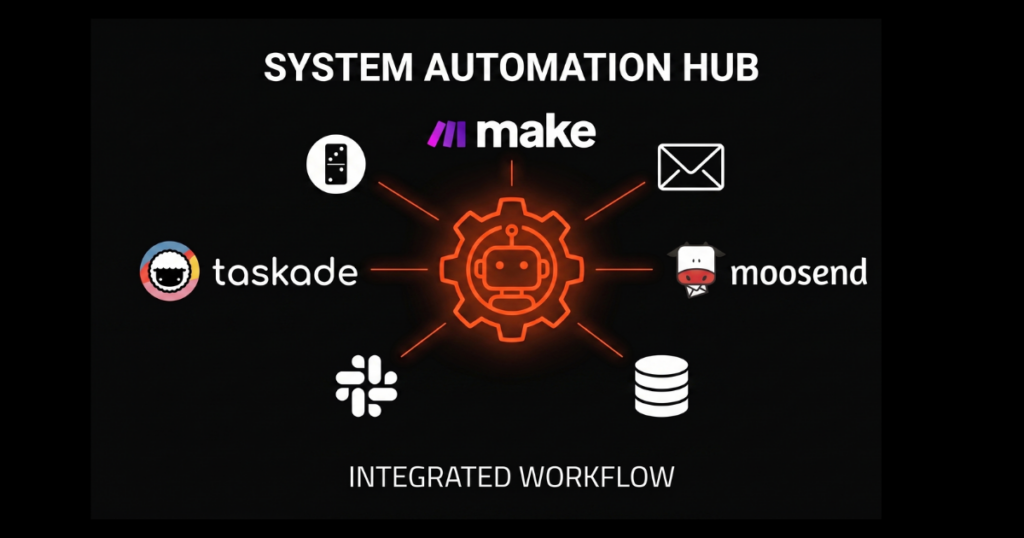
- The exact tool stack — Make.com, Moosend, Taskade, and how they connect
- The 6 workflows to build first — step by step
- The full stack cost — what it actually costs per month
The Automation Mindset — What to Automate First
Not everything should be automated. The rule is simple: if a task is repetitive, rule-based, and doesn’t require genuine human judgment — automate it. If it requires creativity, relationship, or real-time problem solving — keep it human.
The best candidates for automation are tasks you do the same way every time. Sending a welcome email when someone joins your list. Creating a project when a client pays. Logging a sale when Stripe charges a card. These aren’t decisions — they’re procedures. Procedures belong to software.
Automate vs Keep Human
✅ Automate These
- Lead capture → CRM entry
- Welcome email sequences
- Invoice generation
- Task creation from triggers
- Weekly reports
- Social scheduling
- Backup notifications
❌ Keep Human
- Sales calls and demos
- Client relationship check-ins
- Creative strategy
- Conflict resolution
- Pricing decisions
- Product direction
- Anything needing empathy
The 5 Core Automation Categories
1. Lead Capture & CRM
Every lead that enters your world should be automatically captured, tagged, and routed — with zero manual data entry. A form submission, a content download, a webinar signup — all of these should trigger automatic CRM creation, list tagging, and sequence enrollment without you touching anything.
Tool: Make.com connects your form tool (Typeform, Tally, Google Forms) to your CRM and email platform in one scenario. Set it once, run forever.
2. Email Marketing & Nurture
Your email list is your most valuable owned asset. Every subscriber should enter a pre-built sequence that educates, builds trust, and moves them toward a decision — without you manually sending anything. Welcome sequences, nurture flows, re-engagement campaigns, and post-purchase onboarding should all run automatically.
Tool: Moosend at $9/month gives you the full automation engine — behavioral triggers, segmentation, and sequences — with no feature gates on the entry plan.
3. Client Onboarding
The moment a client pays or books, a chain of events should fire automatically: welcome email sent, project workspace created, contract link delivered, onboarding questionnaire triggered, and your calendar updated. What used to take 30 minutes per client takes zero.
Tools: Make.com as the orchestration layer + Taskade for automatic project creation from templates.
4. Finance & Admin
Every Stripe payment should automatically generate an invoice, email it to the client, log the sale in a spreadsheet, and create a delivery task. Expense tracking, payment reminders, and financial summaries should run without manual input. Admin work is the highest-cost low-value task a solo founder does.
Tool: Make.com connecting Stripe → Wave/QuickBooks → Notion → Gmail in a single scenario.
5. Content & AI Workflows
In 2026, content production can be partially automated with AI — not the writing itself, but the research, brief generation, repurposing, and distribution scaffolding. A keyword added to a sheet can trigger a Make scenario that produces a structured content brief via OpenAI, drops it in Notion, and notifies you in Slack.
Tool: Make.com with native OpenAI module + Taskade AI agents for in-workspace execution.
The Solo Founder Automation Stack
The 6 Workflows to Build First
Don’t try to automate everything at once. Build these six in order — they deliver the most time savings and cover the most critical business operations.
Workflow 1 — Lead Capture to Email Sequence
Trigger: Form submitted (Typeform / Tally / Google Forms)
Actions: Create CRM contact → Tag by lead source/answer → Add to Moosend sequence → Send Slack notification
Build time: ~25 minutes in Make.com
Time saved: 3–5 hours/week for active lead flow
Workflow 2 — Welcome Email Sequence (5-part)
Trigger: New subscriber added to Moosend list
Actions: Day 0 welcome → Day 2 value email → Day 4 case study → Day 6 soft pitch → Day 10 follow-up
Build time: ~1 hour in Moosend automation builder
Time saved: Every new subscriber nurtured automatically, forever
Workflow 3 — Stripe Payment → Full Admin Chain
Trigger: Stripe payment successful
Actions: Generate invoice (Wave) → Email to client → Create delivery task in Taskade → Log sale in Google Sheet → Slack alert
Build time: ~30 minutes in Make.com
Time saved: 20–30 minutes per client payment, zero manual admin
Workflow 4 — Client Onboarding Pipeline
Trigger: Calendly booking confirmed OR Stripe payment received
Actions: Welcome email with next steps → Create Taskade project from template → Send onboarding questionnaire → Add to CRM with tags → Slack alert
Build time: ~40 minutes in Make.com + Taskade template setup
Time saved: 30+ minutes per new client
Workflow 5 — AI Content Brief Generator
Trigger: New row added to Google Sheet (keyword + intent)
Actions: Send to OpenAI via Make → Get structured brief back → Write to Notion page with timestamp → Slack notification
Build time: ~20 minutes in Make.com
Time saved: 20–30 minutes per article brief
Workflow 6 — Weekly Business Summary Report
Trigger: Every Monday 8:00 AM (scheduled)
Actions: Pull Stripe revenue (last 7 days) → Pull email list growth from Moosend → Pull completed Taskade tasks → Compile and send summary email to yourself
Build time: ~45 minutes in Make.com
Time saved: Manual reporting eliminated, full visibility every week
The Full Stack Cost — What You Actually Pay
Monthly Breakdown
- Make.com Core: $10.59/mo — automation engine, 10,000 ops, all 6 workflows above
- Moosend Starter: $9/mo — email sequences, segmentation, up to 500 subscribers
- Taskade Starter: $8/mo — projects, AI agents, client workspaces
- Cloudways DO 1GB: $11/mo — fast managed hosting, Cloudflare Enterprise CDN
Total: $38.59/month for a fully automated solo business infrastructure.
That’s ~$463/year for a system that handles lead capture, email nurture, client onboarding, invoicing, content production scaffolding, and weekly reporting — automatically. The average solo founder working without this stack spends 10–15 hours per week on tasks this system replaces.
Where to Start
Don’t try to build everything in a weekend. Here’s the order that delivers the fastest ROI:
- Week 1: Set up Moosend, build your welcome sequence. Every new subscriber gets nurtured from day one.
- Week 2: Set up Make.com, build Workflow 1 (lead capture → CRM → sequence). Lead management becomes zero-touch.
- Week 3: Build Workflow 3 (Stripe → admin chain). Every payment handled automatically.
- Week 4: Build Workflow 4 (client onboarding). New clients get a professional experience without your manual effort.
- Month 2: Build the AI content brief workflow and weekly report. The system now helps you produce and measure.
By the end of month two, you have a business that runs — and reports on itself — largely without you in the operational loop. That’s the point. The goal isn’t to work less. It’s to redirect those hours toward the things only you can do.
Want to go deeper on any tool in this stack? We’ve reviewed each one in full:
- Make.com Review 2026 — the full automation engine breakdown
- Moosend Review 2026 — email marketing deep dive
- Taskade Review 2026 — AI workspace and project management
- Cloudways Review 2026 — managed cloud hosting for founders
Start with the automation layer. Everything else connects from there.
Try Make.com Free → No Credit Card Required
Free plan available. Tested & Verified by SaaSGrail.